Overview
Repo: Ujjwal5705/Automate_boring_stuff
Tech Stack: Python, Django, Celery, Redis, Brevo (Sendinblue), CKEditor, BeautifulSoup, Ngrok, PostgreSQL
Automate the Boring Stuff is a Django-based web application that bundles six real-world automation tools into a single authenticated workspace. From processing million-row CSV files to scraping live stock data and tracking whether emails were actually opened, it tackles the kind of repetitive, time-consuming work that clogs up daily operations.
The core challenge wasn't building one tool well—it was building six tools that each handle production-scale workloads without blocking the web server.
Problem
Businesses and developers frequently run into the same class of problems:
- Importing or exporting large datasets between systems and spreadsheets
- Sending bulk emails with attachments—and having no idea if anyone opened them
- Compressing batches of images without touching them one by one
- Pulling live stock data without paying for an expensive API
- Doing any of the above without freezing the UI or timing out the server
Most teams solve these ad hoc—a Python script here, a cron job there—with no shared interface, no tracking, and no retry logic.
Solution
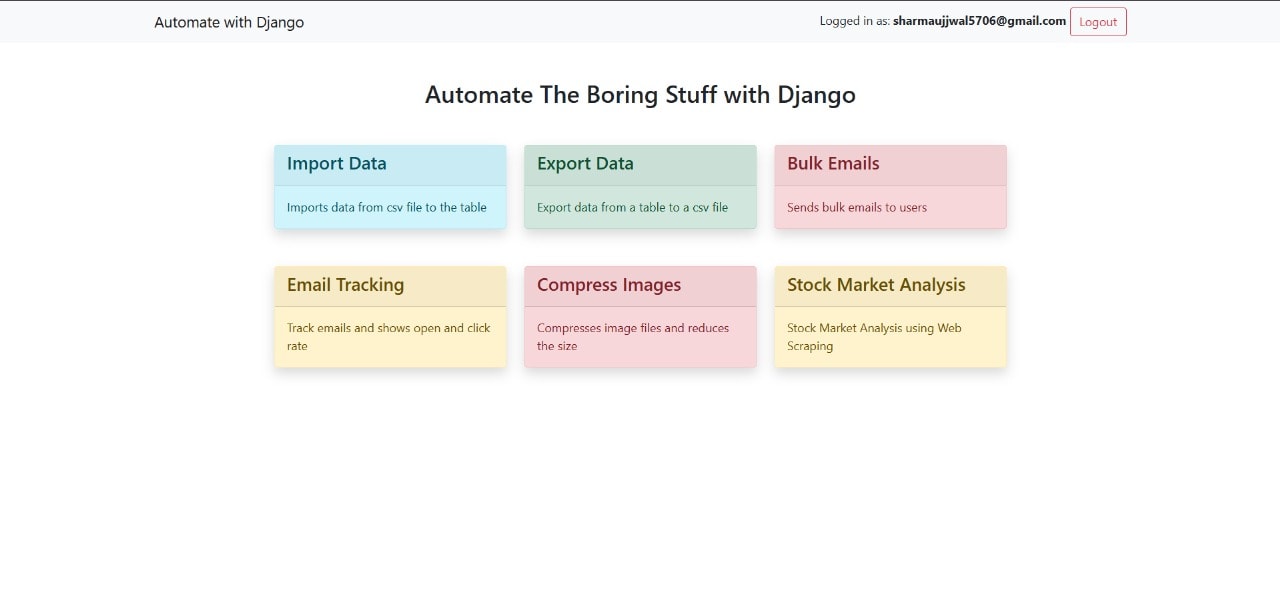
Automate the Boring Stuff consolidates these tasks into a single Django application with a clean, authenticated dashboard. Each tool is a focused module:
- Import Data — Ingests CSV files into database tables, handling up to 1M+ records per upload with chunked processing
- Export Data — Exports table records back to CSV for downstream use
- Bulk Emails — Composes and sends mass emails with rich text (CKEditor) and attachment support via Brevo (Sendinblue)
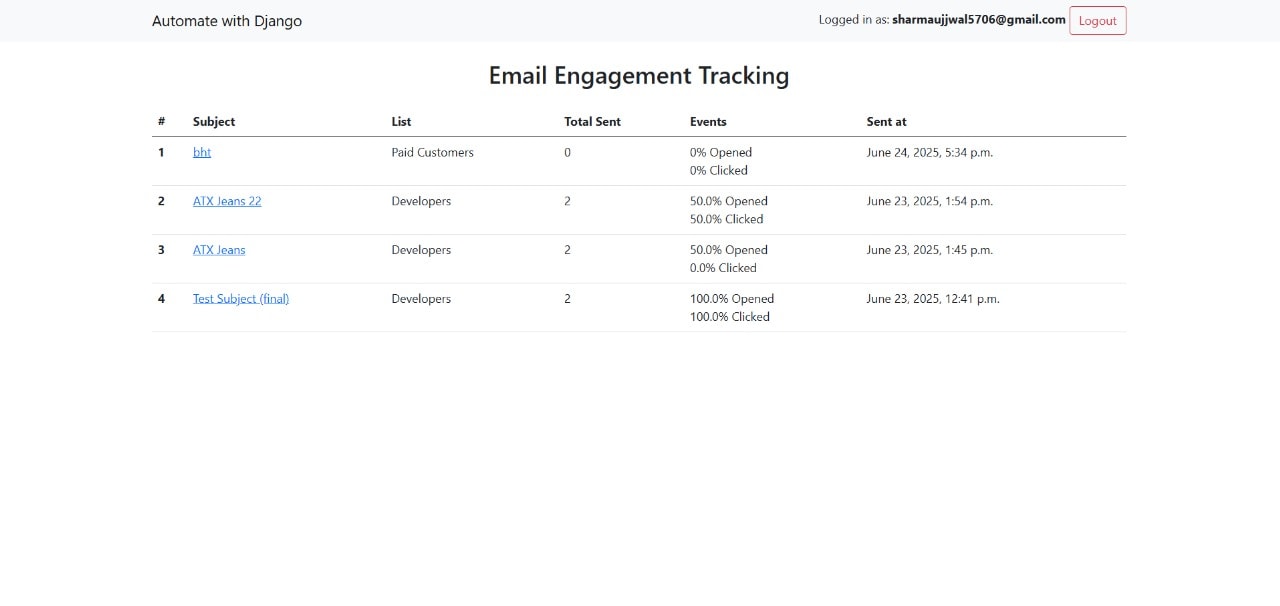
- Email Tracking — Embeds tracking pixels and click-wrapped links to capture open rates and click rates per campaign
- Compress Images — Reduces image file sizes in bulk, making them web-ready without quality loss
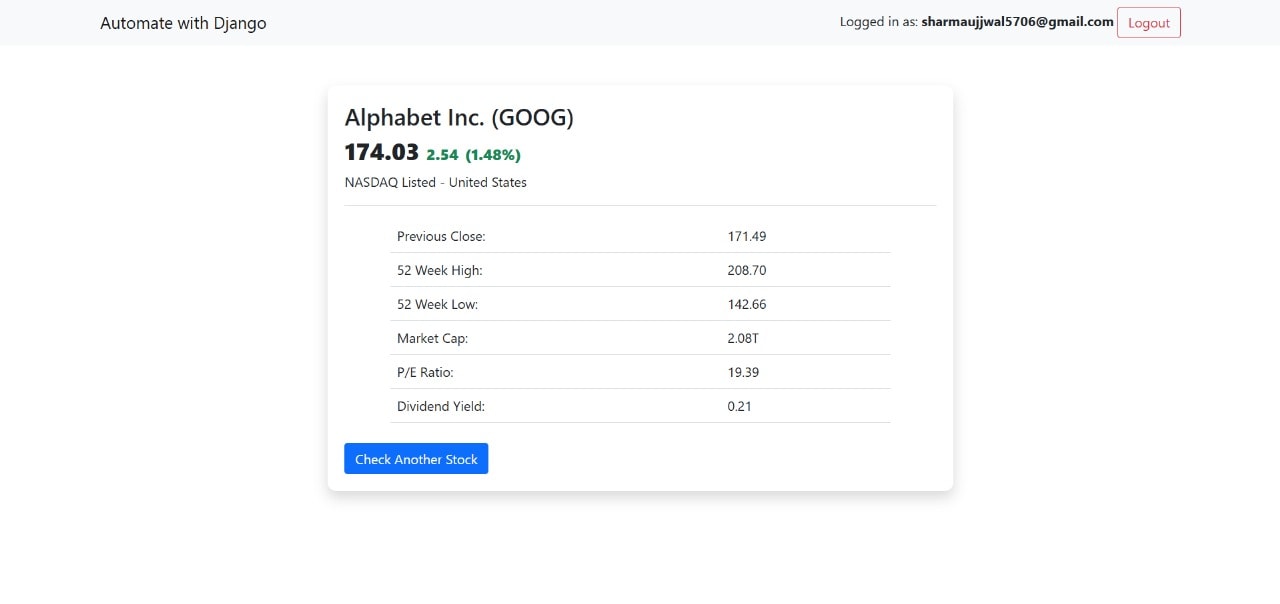
- Stock Market Analysis — Scrapes live market data and surfaces it in a structured, readable format
Architecture
The application is built as a monolithic Django project with task isolation handled by Celery and Redis.
- Django (Python): Core web framework handling routing, authentication, views, and ORM-based database access
- Celery + Redis: All long-running tasks—bulk email sends, large CSV imports, image compression—are offloaded to Celery workers with Redis as the message broker. This keeps the web server responsive regardless of job size
- Brevo (Sendinblue): Transactional and bulk email delivery. Handles SMTP relay, delivery tracking, and attachment support
- CKEditor: Rich text editor integrated into the email composition flow, allowing formatted email bodies with headers, lists, and inline styles
- Web Scraping: Stock market data is pulled via a scraping pipeline, parsed, and stored for display—no paid data API required
- Ngrok: Used for local tunneling during development, enabling webhook callbacks (email open/click tracking pixels) to reach the local server
Challenges
1. Processing 1M+ Records Without Blocking
Naive CSV import—reading the file in the request cycle—would time out instantly at scale. I offloaded imports to a Celery task that streams the file in chunks, writing rows to the database in batches. This decoupled the upload response from the actual processing time, letting the UI return immediately while the job runs in the background.
2. Email Open and Click Tracking
Tracking whether an email was opened isn't straightforward. I implemented a tracking pixel—a 1×1 transparent image served by Django—embedded in every outgoing email. Each open fires a GET request back to the server, which logs the event against the campaign. For click tracking, outbound links are routed through a redirect endpoint that logs the click before forwarding. This gave per-campaign open rates and click rates without any third-party analytics dependency.
3. Bulk Emailing With Attachments
Brevo's API handles delivery, but composing emails with attachments—handling file encoding, MIME types, and per-recipient personalization—required careful construction of each payload. Sending was pushed to Celery so a 500-recipient campaign doesn't block the view layer.
4. Stock Data Without a Paid API
Rather than paying for a market data subscription, I built a scraper that pulls live prices and metadata from public sources. The scraper is structured to be resilient to minor HTML changes and outputs a normalized data structure the frontend can render directly.
Learnings
The biggest lesson was understanding where Django's request-response cycle breaks down under load. A tool that works fine with 100 rows can explode at 100,000. Reaching for Celery early—rather than as a fix—would have saved significant refactoring.
Email tracking taught a subtler lesson: infrastructure that looks simple (a 1×1 image) has real reliability requirements. If the tracking endpoint is slow or down, every tracked email loads with a delay. Keeping that endpoint minimal and fast was non-negotiable.